

Piano Tree is the better choice for sight reading. MasterPiano is a new app, founded in 2025 by a piano student working through the ABRSM grades, with levels set by a model and a metronome that is off when you press play. Piano Tree is built by piano teachers: 25,000+ pieces placed by teachers, at half MasterPiano's monthly price.
Part of our series comparing piano sight reading apps. For all 14 apps side by side, see Best Piano Sight Reading Apps for 2027.

MasterPiano publishes its own ranking of sight reading apps, and puts itself first. This page is our side of the comparison. I teach piano, run a music school and help build Piano Tree, and I compare the two apps on what matters if your goal is to read real music fluently.
One thing to say up front: we make Piano Tree. Every fact about MasterPiano comes from what MasterPiano publishes itself or from my own test of the app, and the sources are listed at the end.
What does Piano Tree have that MasterPiano doesn't?
- Three times the music. 25,000+ graded pieces and exercises, against MasterPiano's 7,000 to 8,000.
- Levels set by teachers. Every piece in the Piano Tree Path was placed by a piano teacher. MasterPiano says a model sets its levels.
- A metronome and a count-in, in seconds or two full measures, with subdivisions. In MasterPiano the metronome is off when you press play, and we had to search the Setup menu to find it.
- Timing that is really checked. MasterPiano gave a perfect rhythm score to a piece played 40% too fast, and to a student playing late with the metronome on.
- No letter names on the score. In Piano Tree you click a note to see its name. MasterPiano prints the letter next to the notes in its exercises.
- A library organized by style and period, and a Path of 100 small steps. MasterPiano's library is one mixed list.
- All 371 Bach chorales and a chorale course. Searching MasterPiano for "bach chorale" gives ten results.
- A microphone built for acoustic pianos. MasterPiano is built around MIDI, and a piano teacher who reviewed it found its microphone too inconsistent to use.
- Arrangements that say they are arrangements. The same review found simplified pieces in MasterPiano with no label.
- Half the monthly price: $9.99 against $19.99.
- Licensed sight reading books: Paul Harris's Improve your sight-reading! and A Piece a Week, from Faber Music.
- Orchestral backing tracks written to each piece's own harmony, and fermatas and repeats that work.
- Fingering you can edit, practice by voice, lead sheets, writing on the score, read-ahead, transposition with a key lock, and piano duets.
I checked MasterPiano's app, website and App Store listing. If MasterPiano has added any of these since, tell us and we will update this page.
How do Piano Tree and MasterPiano compare side by side?
| Piano Tree | MasterPiano | |
|---|---|---|
| Built by | Piano teachers, composers and software engineers | Founded in 2025 by a piano student working through the ABRSM grades (Toronto) |
| Library | 25,000+ graded pieces and exercises | 6,000+, 7,000+ or 8,000+ depending on the page, plus "infinite" sight reading pieces in Premium, with no source given |
| How the library is organized | By style and period, and in the 100-step Path | One mixed list |
| Who sets the levels | Piano teachers, piece by piece | A model, then adjusted by players' results |
| Levels | 20 levels, 100 small steps, first notes to diploma | Levels 1 to 100 |
| Metronome and count-in | Yes, with a count-in and subdivisions | Off when you press play, hidden in the Setup menu |
| Rhythm scoring in my test | Early and late notes marked | 100% for a piece played at 170 instead of 120, and 100% for a student playing late with the metronome on |
| Note names | Click a note to see its name | Printed next to the notes in its exercises |
| Bach chorales | All 371, plus a chorale course | Ten results for "bach chorale", one of them by Schumann |
| How it listens | MIDI or microphone, on a digital or acoustic piano | Its Terms of Service say it "requires a MIDI keyboard for full functionality"; a piano teacher's review found its microphone too inconsistent to use |
| Free plan | Hundreds of pieces, unlimited sight reading tests, no time limit | 10 minutes of practice a day |
| Arrangements labeled | Yes, the arranger is credited (for example "J.S. Bach / Tomas Iglesias") | Simplified arrangements shown with no label, according to the same review |
| Backing tracks | Orchestral, written to each piece's harmony | No |
| Licensed books | Paul Harris (Faber Music) | Not found |
| Edit the fingering | Yes, on any note | Not found |
| Languages | English, Spanish, Chinese | Not stated |
| Price, yearly plan | $8.33 a month | $8.33 a month |
| Price, month to month | $9.99 | $19.99 |
| Platforms | Web, desktop app, Windows, Mac, Chromebook, iPhone, iPad, Android | Web, iPhone, iPad, Mac, Android |
What did I find when I tested MasterPiano?
I tested MasterPiano on 25 November 2026 with a MIDI keyboard, the way I assess any new material before I give it to my students. Here is what I found.
You grade yourself
MasterPiano opens with an onboarding you cannot skip, and it asks you to judge your own level. In my studio, students never choose their level. I do, because the pieces students want to play are rarely the pieces they are ready to read.
"Up to 5x faster"
The onboarding then promises to teach you to sight read "up to 5x faster", next to the logos of four universities and research institutes. The small print explains the number: it compares MasterPiano with "one ABRSM grade a year", and it says 1 in 5 players who read three or more days a week climbed five grades or more in a year, with a median of 2.4. Those grades are measured on MasterPiano's own levels, set by its own model, not in exams.
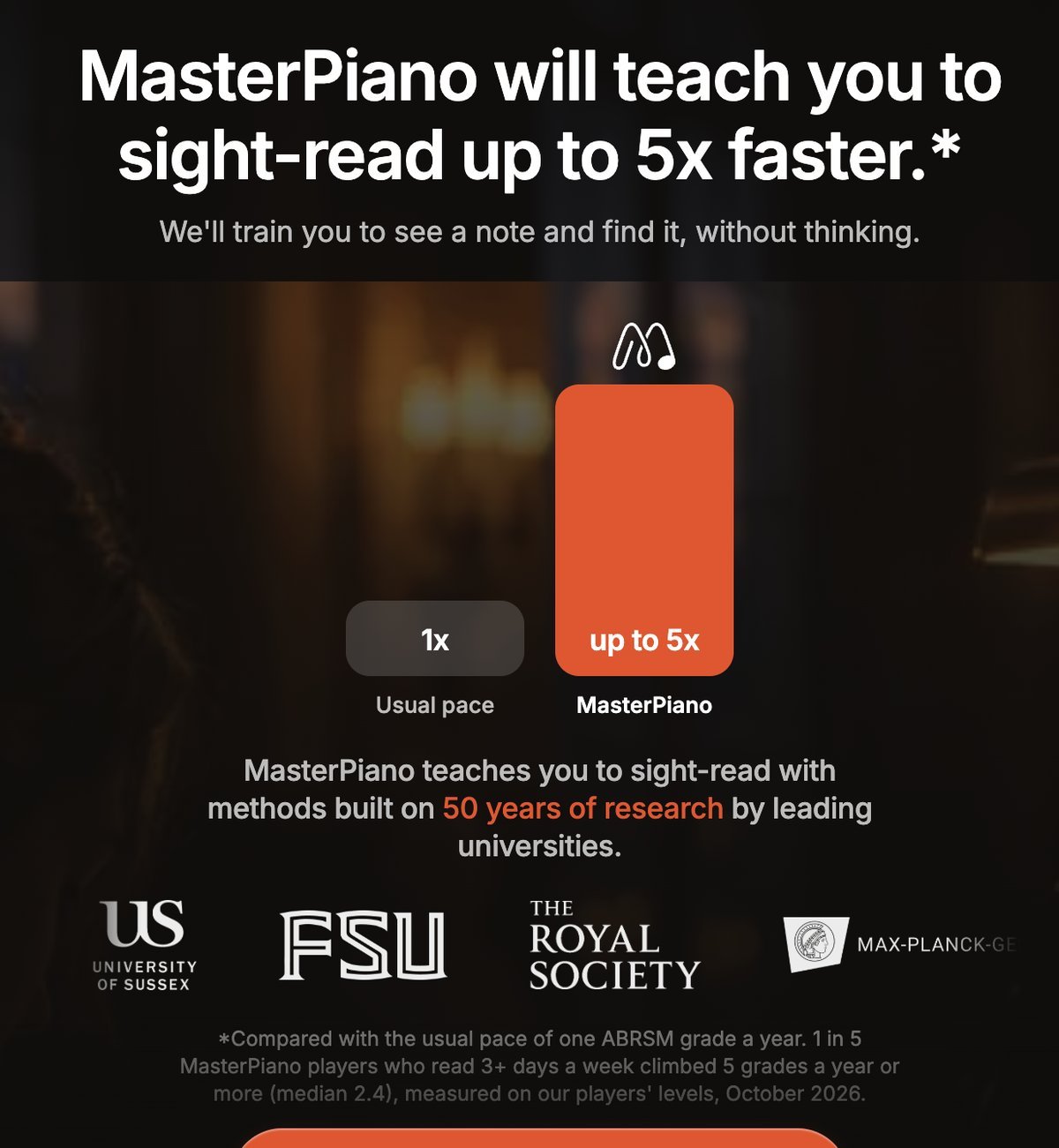
MasterPiano's onboarding. The small print: the grades are "measured on our players' levels".
Every student learns at a different rate. A teacher would never promise a number like this, and nothing on the screen says those institutions tested MasterPiano.
A hidden metronome, and timing that does not count
When I pressed play on my first piece, no metronome started. There was no count-in and no beat to follow. A beginner is left to keep time alone, which is exactly what a beginner cannot do yet. The piece is marked 120 beats a minute. I played it at 170, 40% faster, and not steadily in time. The app gave me 100, with 100% for rhythm, 100% for pace and "No points lost".
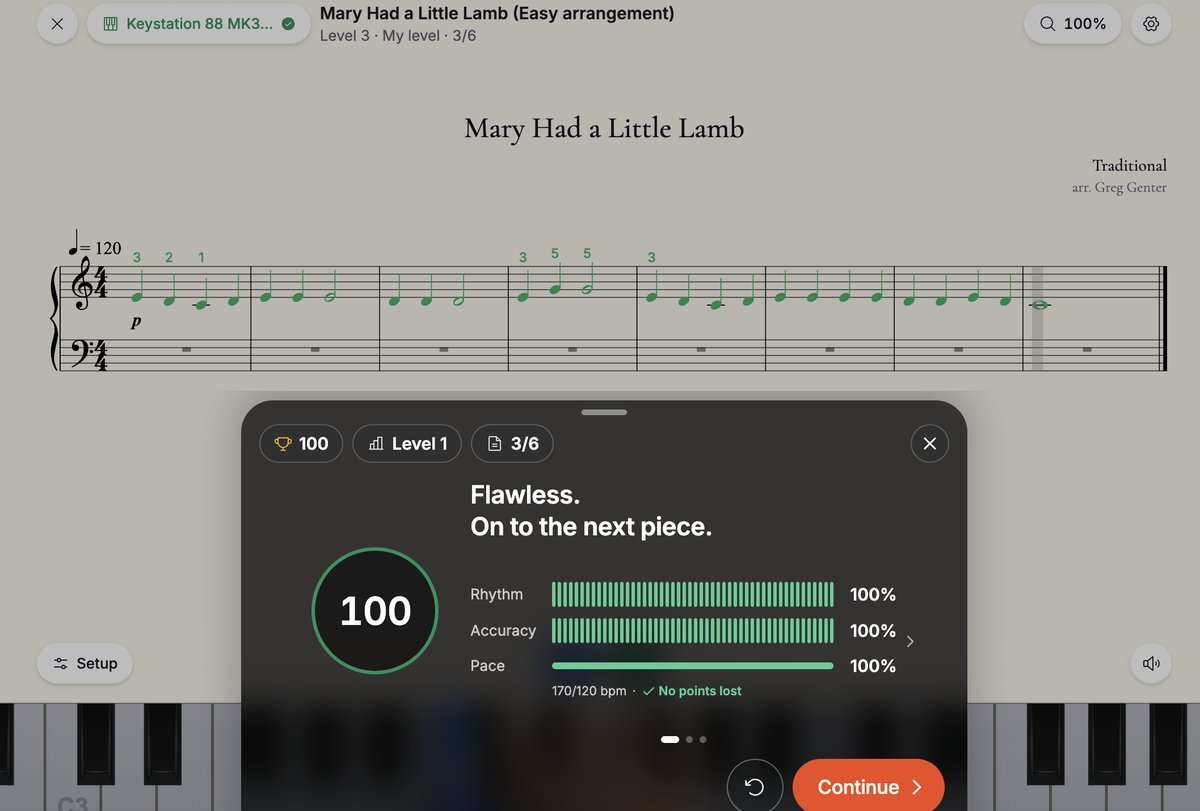
"Flawless": played at 170 in a piece marked 120 (bottom line, 170/120 bpm), with 100% for rhythm and pace and "No points lost".
The metronome does exist, but it is off by default, and it took us a while to find it inside the Setup menu. So I turned it on and asked one of my students to play, on my professional MIDI setup. I have worked as a film composer for more than ten years, and I know how MIDI timing behaves. She played slightly behind the beat, a little late in places. MasterPiano gave her 100, "Perfect!", with 100% for rhythm and "No points lost". While we listened, MasterPiano's own piano playback was out of sync with the score.
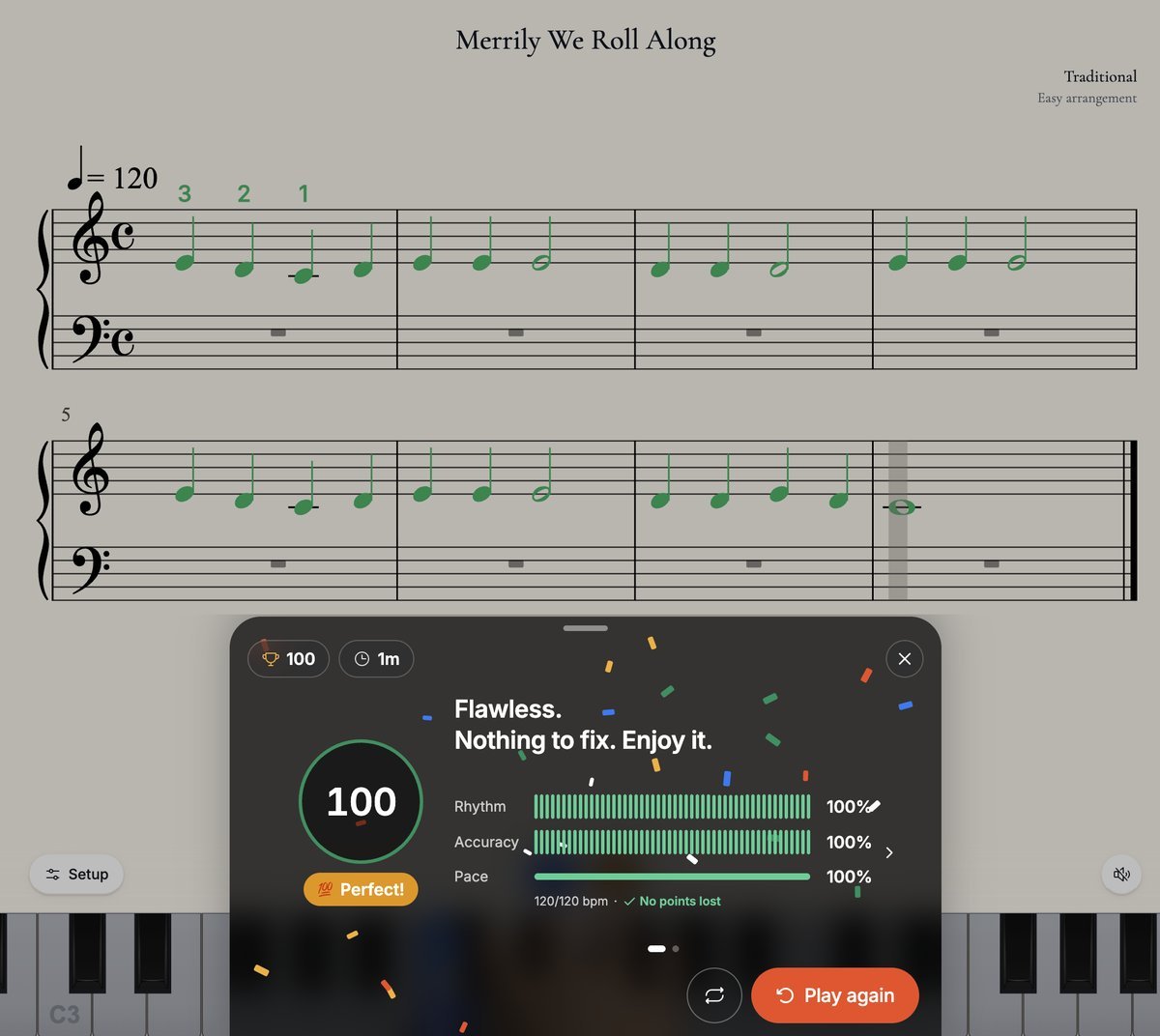
My student, playing late with the metronome on: "Perfect!", 100% for rhythm, "No points lost".
Paul Harris, whose Improve your sight-reading! books we license in Piano Tree, opens the series with two Golden Rules. Golden Rule 1 is "Always count". Golden Rule 2 is "Never stop". He explains why counting comes first: "Playing the notes is not really a big problem in sight-reading." Playing them in time is the hard part.
The very next stage is about the pulse, before a single note is read. You set a metronome to 60 and simply listen to the beat, which he compares to your own heartbeat: it is what keeps the music alive. A good sight reader, he explains, has an inner metronome that never stops clicking.
Music happens on a timeline. Counting is the golden rule of sight reading, and an app that gives 100% for rhythm to a piece played 40% too fast, or to a student playing late, breaks it from the first piece.
Music without a pulse is like a body without a heartbeat.
Letter names on the score
MasterPiano's own exercises print the letter name next to the notes. Piano teachers spend years asking students not to write letter names on their music, because a student who reads letters is not reading the staff. In Piano Tree, the score stays clean: if you are unsure of a note, you click it to see its name, then go back to reading.
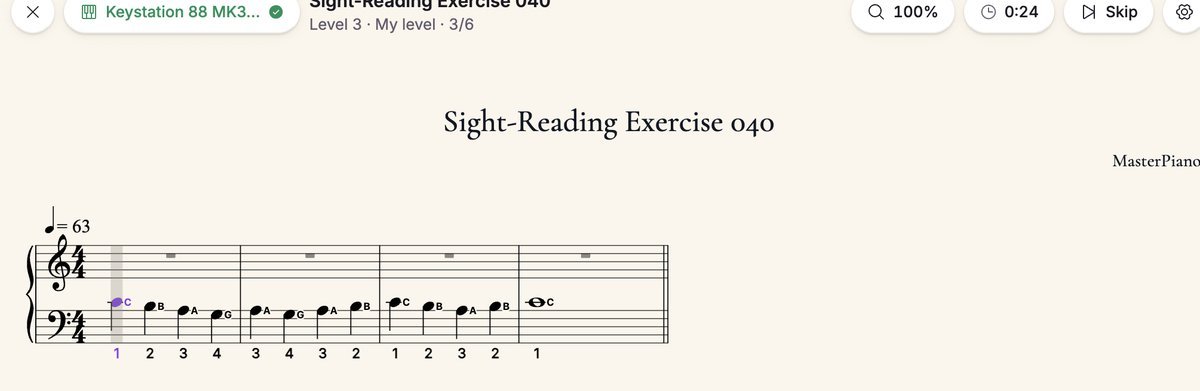
MasterPiano's Sight-Reading Exercise 040, credited to MasterPiano, with a letter name next to the notes.
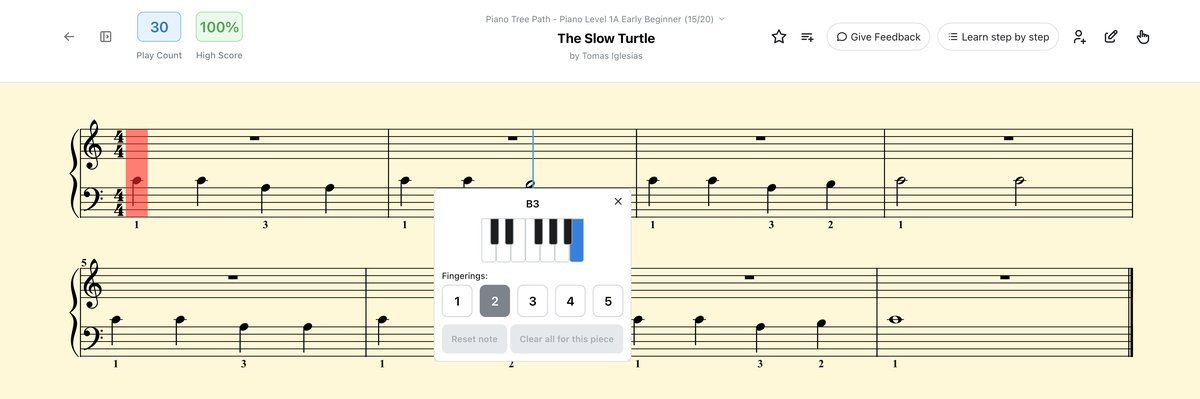
Piano Tree: the score stays clean. Click a note to see its name, and change its fingering if you want.
A technique lesson that teaches the wrong hand position
MasterPiano also has a Technique section. In its C major scale for the right hand, the animated hand shows fingers 4 and 5 over the black keys while finger 3 plays E. In a C major scale the hand stays over the white keys, and a hand that drifts over the black keys is a habit a teacher corrects in the first lesson.
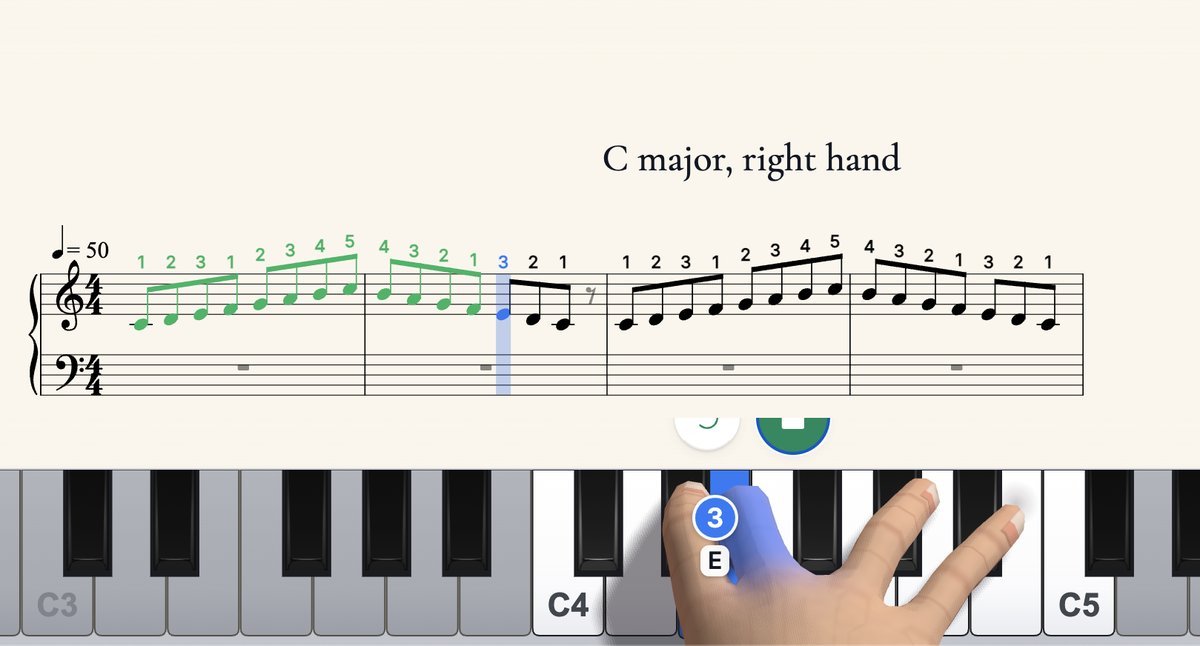
MasterPiano's C major scale: finger 3 on E, with fingers 4 and 5 over the black keys.
We do not teach technique in the app, on purpose. Technique needs a teacher who can see your hands. For that, Piano Tree works with concert pianist Denis Zhdanov, first prize winner at the Maria Canals Competition in Barcelona and a senior lecturer at the University of Music and Performing Arts Graz. His course Piano Foundations takes you from your first notes to late intermediate, with a year of Piano Tree included. You can read more about Denis on his website.A library with no order
MasterPiano's "Most played" list puts Mary Had a Little Lamb next to Beethoven, Joplin's The Entertainer, Yann Tiersen, Handel's Hallelujah chorus and Jingle Bells. Its "Learn step by step" section says "Coming soon".
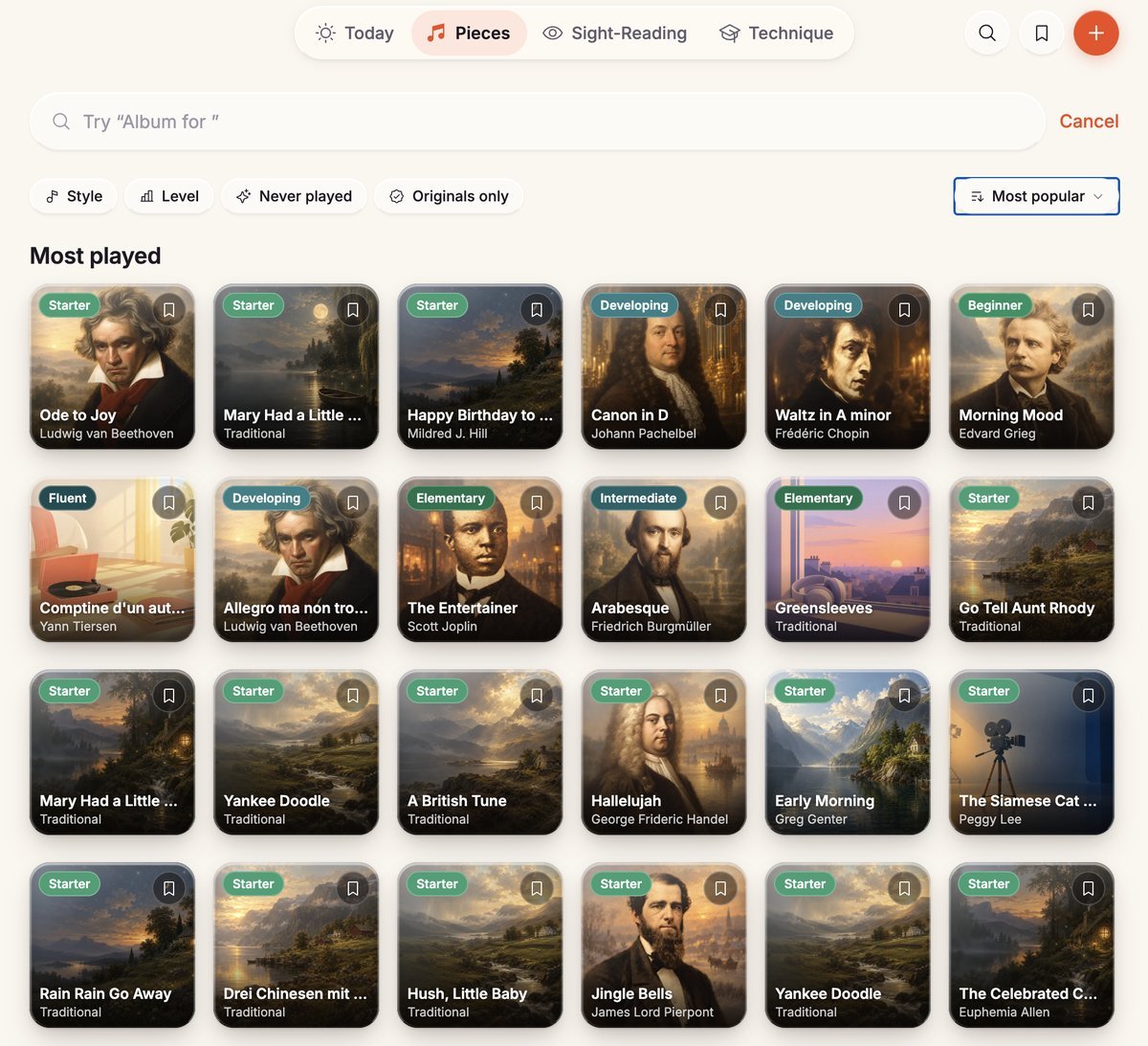
MasterPiano's library: one mixed list.
In Piano Tree, everything is organized by style and period, from Baroque to jazz, and every piece also sits on a step of the Path. And "Learn step by step" is already there, as you can see at the top of the Piano Tree screenshot above.
Bach chorales, side by side
I searched MasterPiano for "bach chorale". It found ten pieces, and one of them is a chorale by Schumann. Another is a concert arrangement by Busoni.
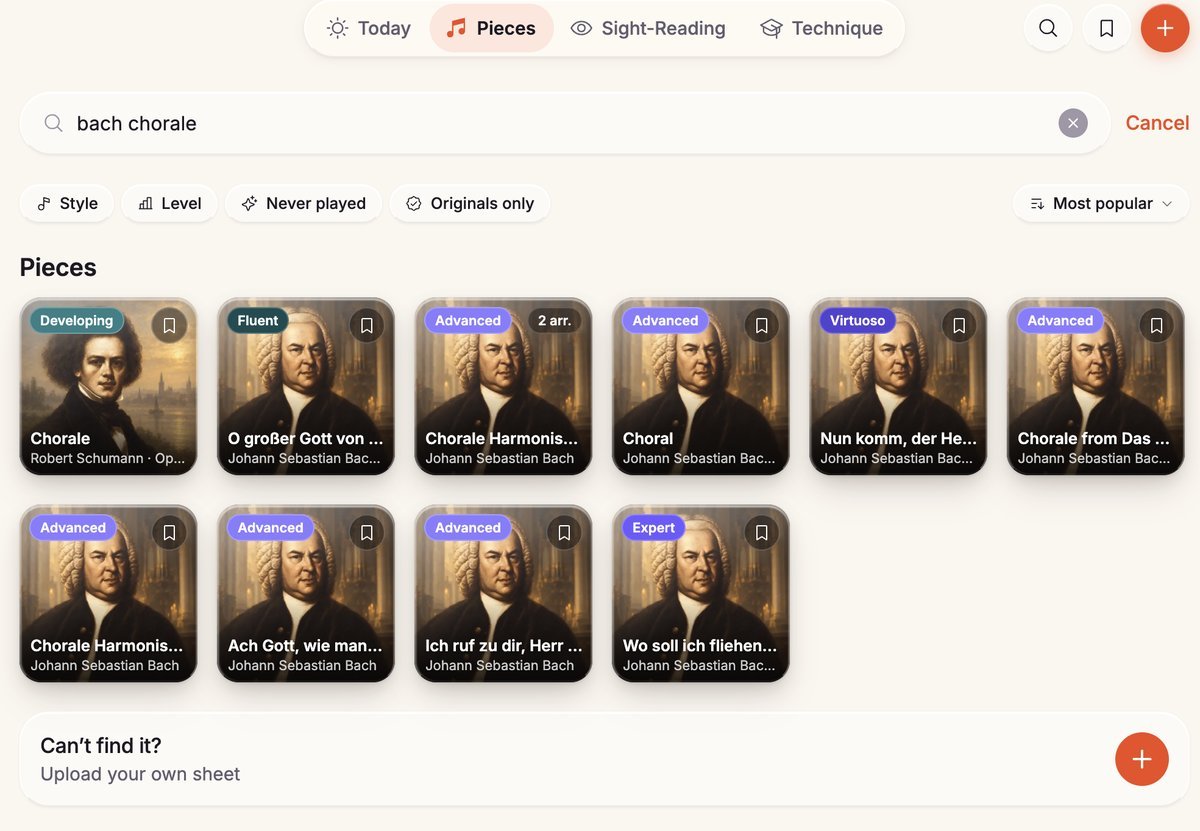
MasterPiano: ten results for "bach chorale".
Piano Tree has all 371 Bach chorales and a chorale course that adds one voice at a time, from the melody alone to open score in the original clefs.Then I opened one of MasterPiano's chorales, Ach Gott, wie manches Herzeleid. On the first beat, the left hand is given fingers 5 and 2 for an A and the C sharp a tenth above it. No hand can play a tenth between fingers 5 and 2.
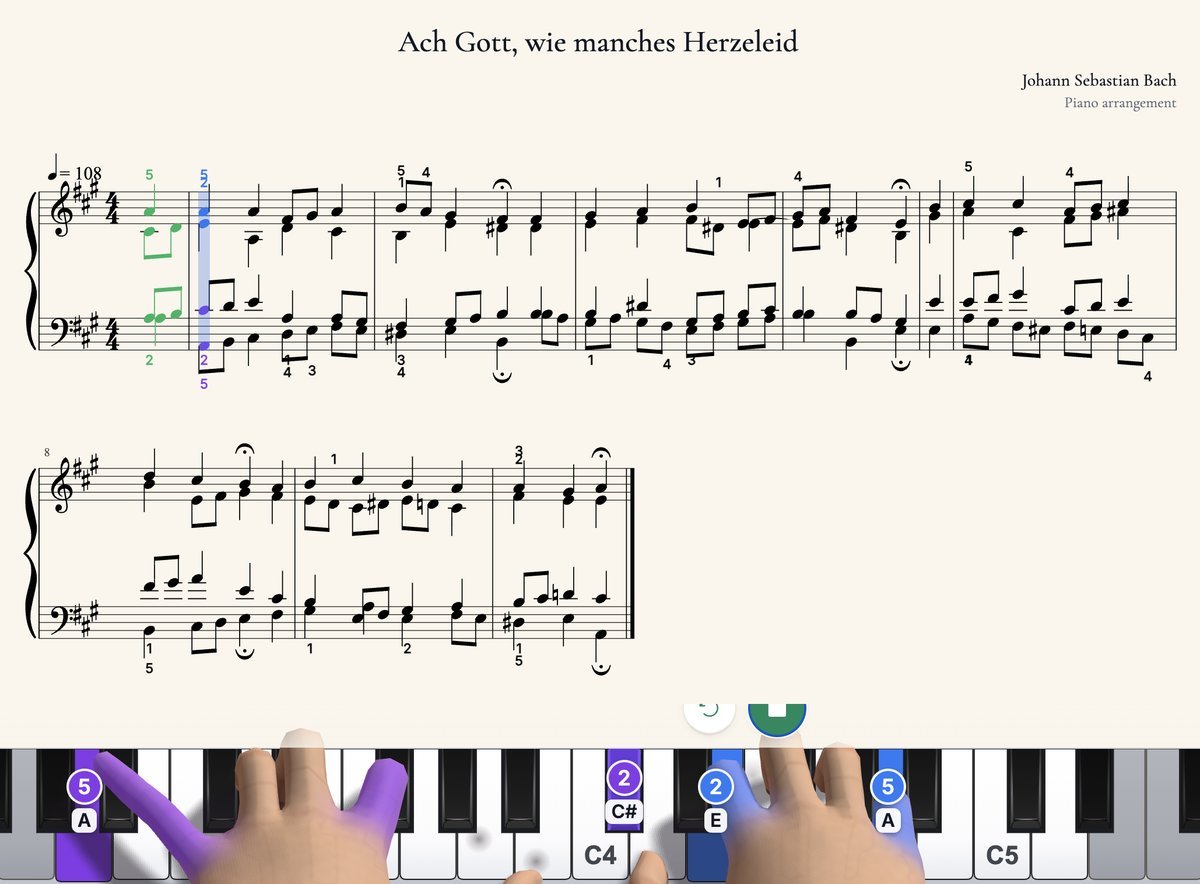
MasterPiano: the left hand is asked to stretch a tenth between fingers 5 and 2.
A pianist would give the tenor's C sharp to the right hand thumb. The right hand then plays an A major chord in first inversion, C sharp, E and A, with fingers 1, 2 and 5, and the left hand keeps the bass. Keyboard players have shared the tenor between the hands for centuries, and it is why our chorale course includes the chorales in continuo style: it teaches you to play them that way.
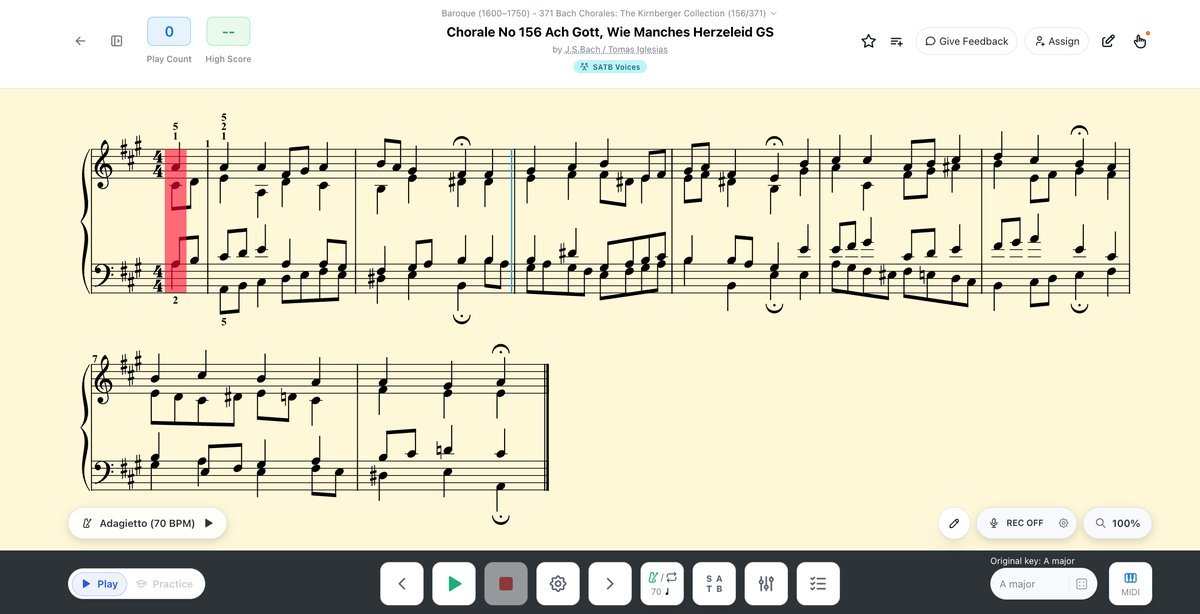
Piano Tree: the same chorale, with the right hand thumb on the tenor, plus Bach's fermatas, a metronome and practice by voice.
The experience
There are no backing tracks, and with the animated hand moving over the keyboard, playing MasterPiano feels dry and computer generated. In Piano Tree you play with an orchestral backing track written to the piece's own harmony, the fermatas and repeats work, and the metronome is always there.
If you have a correction to any of this, email us with the details and we will update this page.
Who builds each app?
MasterPiano was founded in 2025 in Toronto. Its About page describes its founder as a pianist working through the ABRSM grades: in other words, a piano student. It does not mention teaching. No teachers are credited. Many of my own students are working through the ABRSM grades too.
Even so, MasterPiano's "Learn piano online" page says its accuracy tracking is something "many in-person teachers can't match". In my test, that tracking gave a perfect rhythm score to a student playing late.
Piano Tree is built by four pianists: two piano teachers and two software engineers. I hold a music degree from the University of Auckland, have taught piano for more than 15 years, direct the School of Musical Arts in Auckland, and have worked as a film composer for more than a decade. Victor Nocelli, our popular music specialist, has performed on stages in Buenos Aires, Europe, Asia and the Americas. Benjamin Calace and Guillermo Caserotto, our engineers, are pianists who use the app in their own practice. You can meet the team on our About page.Who decides the level of each piece?
This is the biggest difference between the two apps. MasterPiano's About page explains that the app measures features of each score, such as note density, accidentals, range and chord size, and that a model compares those measurements with pieces whose level is already known, then places the piece on a scale from 1 to 100. After that, a piece moves when players' results show it is too easy or too hard.
No teacher appears anywhere in that process. The only teacher on MasterPiano's About page is Natalie, whose outside review on the Music Matters Blog is quoted further down this page.
In Piano Tree, a teacher places every piece. The Path is built so that each step adds one new reading skill: 4/4 time at Level 1A, eighth notes at 3A, three-note chords over a bass at 4C, syncopation at 6A, triplets at 9A. When a piece turns out to be in the wrong place, I move it myself.
A model can count notes, leaps and accidentals. It cannot tell that a piece is the first time a student meets a dotted rhythm in the left hand, or that a fingering asks for a stretch no hand can make. That judgment is what turns a library into a course.
A model can count notes. A teacher knows what a piece teaches.
What do you actually read?
MasterPiano describes its library as classical works, traditional songs and sight reading exercises, "from Bach to film themes", and does not say where its scores come from. Its Premium plan also promises "infinite" graded sight reading pieces, without saying who or what writes them.
The Music Matters Blog review adds two more problems. Some pieces, such as Chopin's Waltz in A minor, are simplified arrangements with no label saying so, so a pianist does not know what they are actually learning. And staccato notes played as written were marked down for note length.
Piano Tree has three times as much music, organized by style and period, and we can tell you where every part of it comes from:
- Repertoire from Baroque and Classical keyboard music to Romantic studies, hymns, jazz, blues, tango and pop, edited by our team.
- Original pieces our teachers wrote for each step of the Path.
- Paul Harris's sight reading books, licensed from Faber Music and in the app as published.
- Lead sheets, grooves, loops and tango accompaniments written by Victor Nocelli.
- Sight Reading Focus Packs that each train one sub-skill: intervals, ledger lines, rhythms, polyrhythms, cadences in random keys, imitations, fugue expositions, open score and more.
- All 371 Bach chorales, with a chorale course that builds up to them one voice at a time.
Which app works on an acoustic piano?
MasterPiano is built around a MIDI keyboard. Its App Store subtitle is "Sight-Read with MIDI Feedback", and its homepage describes feedback through a USB or Bluetooth MIDI keyboard. Natalie, the piano teacher behind Natalie's Piano Studio, reviewed MasterPiano on her Music Matters Blog in September 2026, the review MasterPiano's own About page points to. She found its microphone option "so inconsistent that it rendered any sightreading or repertoire playing attempts useless", and called the need for a MIDI keyboard its biggest limitation. MasterPiano says much the same itself: its Terms of Service state that the service "requires a MIDI keyboard for full functionality", and its own comparison of piano apps admits its microphone scoring is weaker than MIDI on fast chords and pedaled passages.
Piano Tree works with MIDI on a digital piano, or with your device's microphone on an acoustic piano. Our new microphone engine hears chords of up to six notes and shows wrong, early and late notes, even in fast music. When I played half a beat late on purpose, it marked those notes as late. Teachers and students who have tried the new version have been impressed:
How much do Piano Tree and MasterPiano cost?
On the yearly plan, both cost $8.33 a month. Month to month, Piano Tree is $9.99 and MasterPiano is $19.99, so Piano Tree costs half as much.
Both have a free plan, but they are not the same. MasterPiano's free plan gives you 10 minutes of practice a day, and one Google Play reviewer complained that despite the "start for free" button, there was no free version without a trial or payment. Piano Tree's free plan has hundreds of pieces and unlimited sight reading tests with no time limit, and Premium comes with 7 days free, no card needed.
For the same yearly price, Piano Tree gives you three times the music, levels set by teachers, a metronome, a microphone that works on acoustic pianos, licensed books and backing tracks. Your practice time is limited, so spend it on music a teacher has graded.
Which should you choose?
Choose Piano Tree if you want to read real music fluently, play an acoustic piano, are working toward an exam or a diploma, or teach piano and want reading material graded by teachers.
MasterPiano only makes sense if you play only on a MIDI keyboard, want music graded by a model, and do not mind a rhythm score that gives 100% to playing that is out of time.
Find your reading level in a few minutes. Take the free Sight Reading Test and start at the right step of the Path.Piano Tree vs MasterPiano: questions
Is Piano Tree or MasterPiano better for piano sight reading?
Piano Tree. It is built by piano teachers, has 25,000+ pieces placed on the Path by teachers, keeps the pulse with a metronome and count-in, and gives live feedback by MIDI or microphone. MasterPiano has 7,000 to 8,000 pieces, levels set by a model, and is built around a MIDI keyboard.
Who makes MasterPiano?
MasterPiano was founded in 2025 in Toronto. Its About page describes the founder as a pianist working through the ABRSM grades: in other words, a piano student. Piano Tree is built by a team of piano teachers and software engineers, all of them pianists.
Does MasterPiano really teach you to sight read 5x faster?
The claim compares MasterPiano with one ABRSM grade a year, and its small print says 1 in 5 regular players climbed five grades or more in a year, measured on MasterPiano's own levels rather than in exams. The median was 2.4. As a teacher, I cannot see how anyone improves their sight reading by playing without a steady beat. Most of sight reading is counting and not stopping, because music, unlike painting or sculpture, only lives on a timeline.
Does MasterPiano check your rhythm?
Its metronome is off by default and sits inside the Setup menu. In my test, I played a piece marked 120 at 170 and scored 100% for rhythm and pace, and a student playing late with the metronome on got a "Perfect!" 100. Piano Tree marks early and late notes, and its metronome and count-in are part of every piece.
Does MasterPiano work on an acoustic piano?
MasterPiano is built around a MIDI keyboard, and its own Terms of Service say it needs one for full functionality. A piano teacher who reviewed it in September 2026 found its microphone too inconsistent to use. Piano Tree's new microphone engine hears chords of up to six notes, marks wrong, early and late notes, and keeps up with fast passages on an acoustic piano. When I played half a beat late on purpose, it marked those notes as late, which MasterPiano did not do even with MIDI.
How does MasterPiano decide the level of a piece?
According to its About page, a model compares each piece with pieces whose level is already known, and players' results move it afterwards. In Piano Tree, a piano teacher places every piece in the Path by hand.
Which is cheaper, Piano Tree or MasterPiano?
On the yearly plan both cost $8.33 a month. Month to month, Piano Tree costs $9.99 and MasterPiano costs $19.99.
How we checked
MasterPiano's library size, levels, inputs, prices and founder details come from its own homepage, About page, comparison page and App Store listing, checked on 25 November 2026. The test results come from my own test of the app on the same day, and a second test with one of my students using the metronome, with screenshots above. The microphone, arrangement and staccato findings come from a piano teacher's review on the Music Matters Blog. Prices are in US dollars and can change. If anything here is out of date, email us and we will fix it.
- MasterPiano homepage
- MasterPiano About page
- MasterPiano's own ranking of sight reading apps
- MasterPiano on the App Store
- MasterPiano on Google Play
- MasterPiano Terms of Service
- MasterPiano's "Learn piano online" page
- MasterPiano's own comparison of piano learning apps
- Music Matters Blog: MasterPiano App, A Review (8 September 2026)
The Short Version
If you want to read real music fluently, choose Piano Tree. It is built by piano teachers, has three times the music, places every piece by hand, keeps the pulse with a metronome, works on any piano, and costs half as much month to month. MasterPiano sets its levels with a model. In my test its metronome was off and hidden, it scored 100% for rhythm when I played a piece marked 120 at 170 and when my student played late, printed letter names on the score, and gave fingerings no hand can play: basic mistakes in rhythm, reading and technique that a piano teacher would not make.
More in this series: Piano Tree vs Piano Marvel, Piano Tree vs Sight Reading Factory, Piano Tree vs SightReader, Best Piano Sight Reading Apps for 2027