
Piano Tree is the better choice for most pianists. SightReader is a new app built by a software engineer who is learning piano as an adult, with 3,700+ pieces and exercises up to Grade 8. Piano Tree is built by piano teachers: 25,000+ graded pieces from first notes to diploma, with live feedback by MIDI or microphone.
Part of our series comparing piano sight reading apps. For all 14 apps side by side, see Best Piano Sight Reading Apps for 2027.
SightReader publishes its own pages comparing itself with other apps, including a ranking where it comes first. This page is our side of the comparison. I teach piano, run a music school and help build Piano Tree, and I compare the two apps on what matters if your goal is to read real music fluently.
One thing to say up front: we make Piano Tree. Every fact about SightReader comes from what SightReader publishes itself or from my own test of the app, and the sources are listed at the end.
What does Piano Tree have that SightReader doesn't?
- Seven times the music. 25,000+ graded pieces and exercises, against SightReader's 3,700+.
- Real music, written by people. SightReader describes its library as newly composed exercises alongside excerpts from the classical canon, and its endless exercises are written by its own "engine". Piano Tree gives you whole pieces, from Bach chorales to jazz standards, plus selected excerpts and original exercises written by our teachers.
- Built by piano teachers, with our names on the work.
- Beyond Grade 8. The Piano Tree Path runs from first notes to diploma. SightReader stops at Grade 8.
- Timing feedback through the microphone. SightReader's timing scoring needs a MIDI keyboard. Piano Tree shows early and late notes with MIDI or with the microphone on an acoustic piano.
- Three languages: English, Spanish and Chinese. SightReader is in English only.
- Licensed sight reading books: Paul Harris's Improve your sight-reading! and A Piece a Week, from Faber Music.
- Lead sheets, to build your own accompaniment from the chords.
- All 371 Bach chorales, a chorale course, and open score in modern and old clefs.
- Practice any voice of a chorale or fugue, or any combination of voices.
- Orchestral backing tracks written to each piece's own harmony.
- Fingering you can edit, writing on the score, transposition with a key lock, and piano duets.
I checked SightReader's app, website and App Store listing. If SightReader has added any of these since, tell us and we will update this page.
How do Piano Tree and SightReader compare side by side?
| Piano Tree | SightReader | |
|---|---|---|
| Built by | Piano teachers, composers and software engineers | A software engineer learning piano as an adult (sole trader, London) |
| Library | 25,000+ graded pieces and exercises | 3,700+ pieces and exercises |
| The music | Complete pieces, selected excerpts, original pieces and exercises by our teachers, licensed books | Excerpts from the classical canon, new exercises with no composer named, and endless exercises written by its "engine" |
| Levels | 20 levels, 100 small steps, first notes to diploma | Initial to Grade 8 |
| Placement test | Free Sight Reading Test with a Piano Reading Level (PRL) | Placement check, which can be taken in Pitch only mode, with no rhythm scored |
| Who chooses your level | The Sight Reading Test places you on the Path | You choose from sample scores at onboarding |
| How it listens | MIDI or microphone, on a digital or acoustic piano | MIDI, microphone or on-screen keyboard |
| Early and late notes | Yes, with MIDI or the microphone | MIDI only, "still tuning how strict it is" |
| Languages | English, Spanish, Chinese | English |
| Licensed books | Paul Harris (Faber Music) | Not found |
| Lead sheets | Yes | Not found |
| Voice practice and open score | Any voice or combination; open score in modern and old clefs | Left hand, right hand or both only |
| Backing tracks | Orchestral, written to each piece's harmony | No |
| Edit the fingering | Yes, on any note | No |
| Transpose | Yes, with a key lock | No |
| Free plan | Hundreds of pieces, unlimited sight reading tests | 54 pieces, 5 scored exercises a day |
| Price | $8.33 a month on the yearly plan, or $9.99 month to month | About $64 a year (£48), or about $6.70 a month (£5) |
| Platforms | Web, desktop app, Windows, Mac, Chromebook, iPhone, iPad, Android | Web, iPhone, iPad, Android |
What did I find when I tested SightReader?
I tested SightReader on 25 November 2026 with a MIDI keyboard, the way I assess any new material before I give it to my students. Here is what I found.
You choose your own level
SightReader's onboarding shows you some scores and asks you to choose your level yourself. In my studio, students never choose their level. I do. I cannot count the times a student has asked to play Chopin's Fantaisie-Impromptu, and my job was to give them a Clementi sonatina first and teach them to play it in time. Skipping ahead to a higher grade in SightReader also means taking its placement test first.
Rhythm is optional
SightReader lets you play, and even take its placement test, in "Pitch only" mode, where your timing is not scored. On my first piece, Burgmüller's Arabesque, no metronome was running. I played completely out of time and still scored 95%, with a "Distinction".
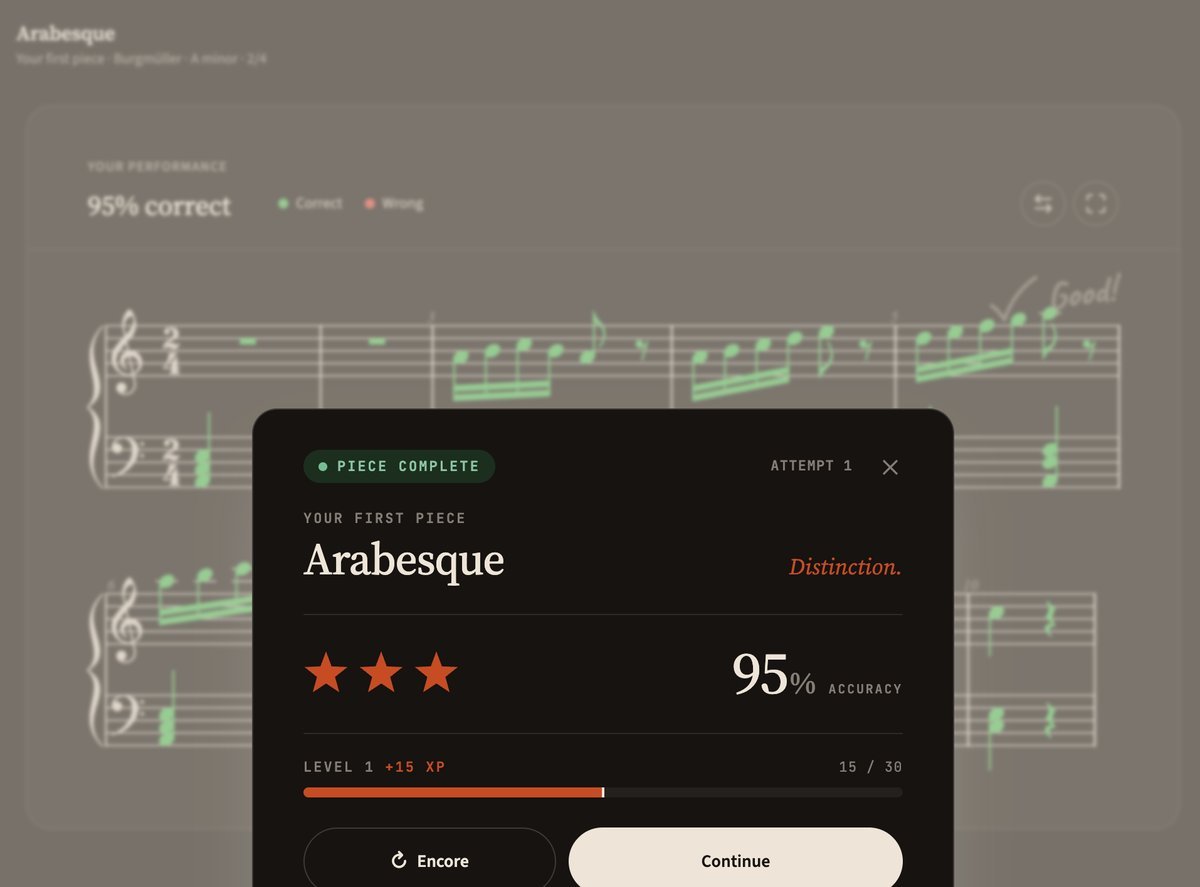
My first piece in SightReader: played out of time in Pitch only mode, and still a 95% "Distinction".
Paul Harris, whose Improve your sight-reading! books we license in Piano Tree, opens the series with two Golden Rules. Golden Rule 1 is "Always count". Golden Rule 2 is "Never stop". He explains why counting comes first: "Playing the notes is not really a big problem in sight-reading." Playing them in time is the hard part.
The very next stage is about the pulse, before a single note is read. You set a metronome to 60 and simply listen to the beat, which he compares to your own heartbeat: it is what keeps the music alive. A good sight reader, he explains, has an inner metronome that never stops clicking.
In SightReader's Pitch only mode there is no counting at all. You can play the right notes at any speed and in any rhythm, and still get a Distinction. It breaks Golden Rule 1 by design.
A sight reading test that ignores the pulse is not testing sight reading.
Exercises written by an engine
SightReader's endless exercises are, in its own words, written "by the same engine as the lessons". The exercises that were written by people do not name their composer, and the composer matters: it tells you the style you are reading.
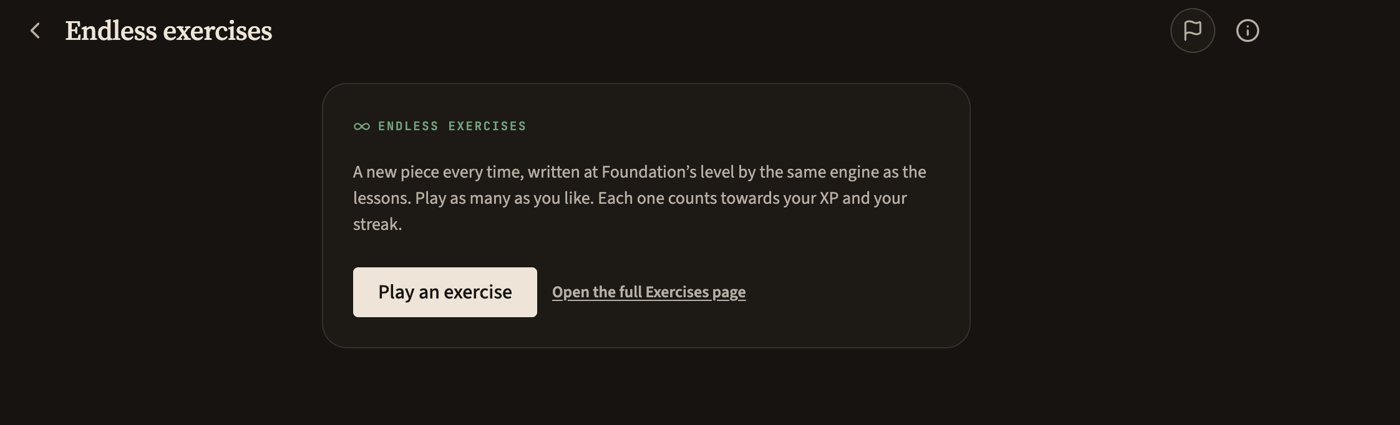
SightReader's own description of its endless exercises.
The grade labels
Then I opened the library and looked up pieces I have taught for years. Several are labeled at grades, and even in keys, that no piano teacher would recognize:
- Chopin's Étude Op. 10 No. 12 in C minor, the "Revolutionary": labeled Grade 5, in E flat major. It is a concert étude, far beyond Grade 8.
- Bach's Invention No. 1 in C: labeled Grade 7. ABRSM set it at Grade 4 in its 2015 and 2016 syllabus, and I prepared students for that exam.
- The Minuet in F, BWV Anh. 113, a beginner's piece from the Anna Magdalena Notebook: labeled Grade 6.
- The Minuet in G, BWV Anh. 116, from the same notebook: also labeled Grade 6. ABRSM set it at Grade 3 in its 2023 and 2024 syllabus.
- Chopin's Waltz in A minor: labeled C major. Bach's Prelude in D minor: labeled F major.
By these labels, the Invention in C is harder than the Revolutionary Étude. If you follow grade labels like these, you will be given music that is far too easy or far too hard, which is exactly what stops a student's reading from improving.
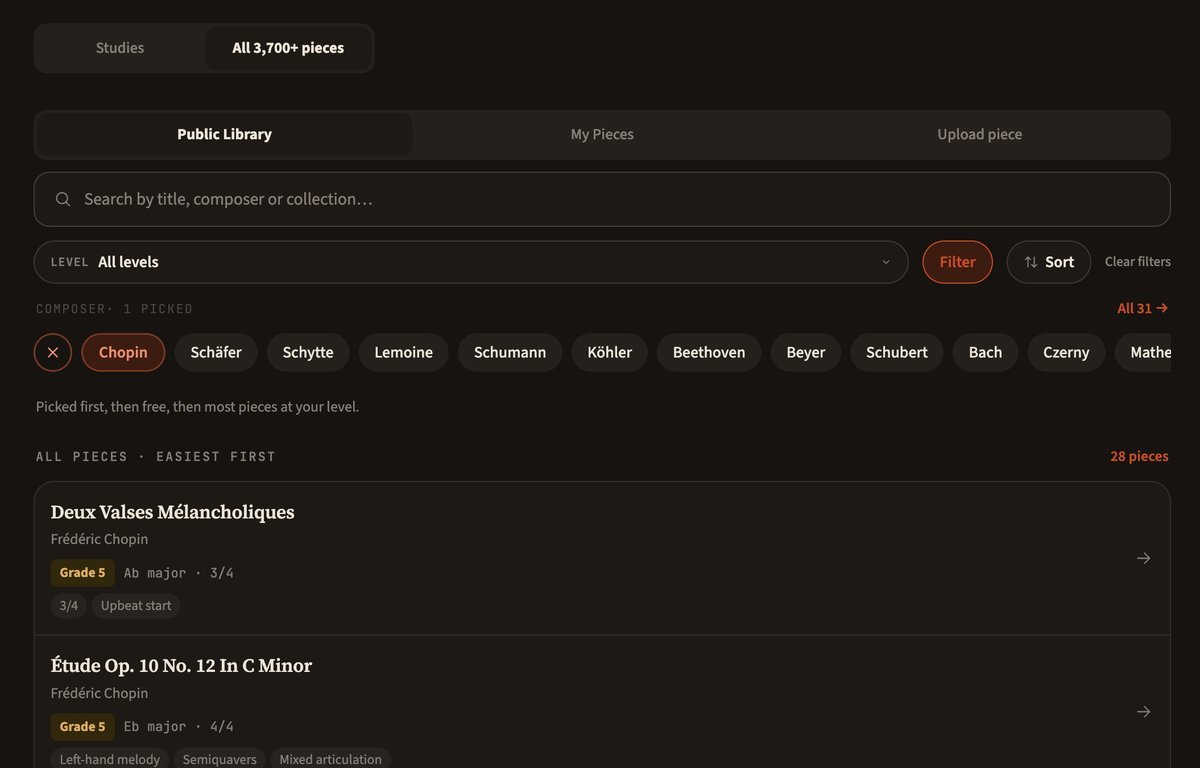
SightReader's library: Chopin's Revolutionary Étude listed as Grade 5, in E flat major.
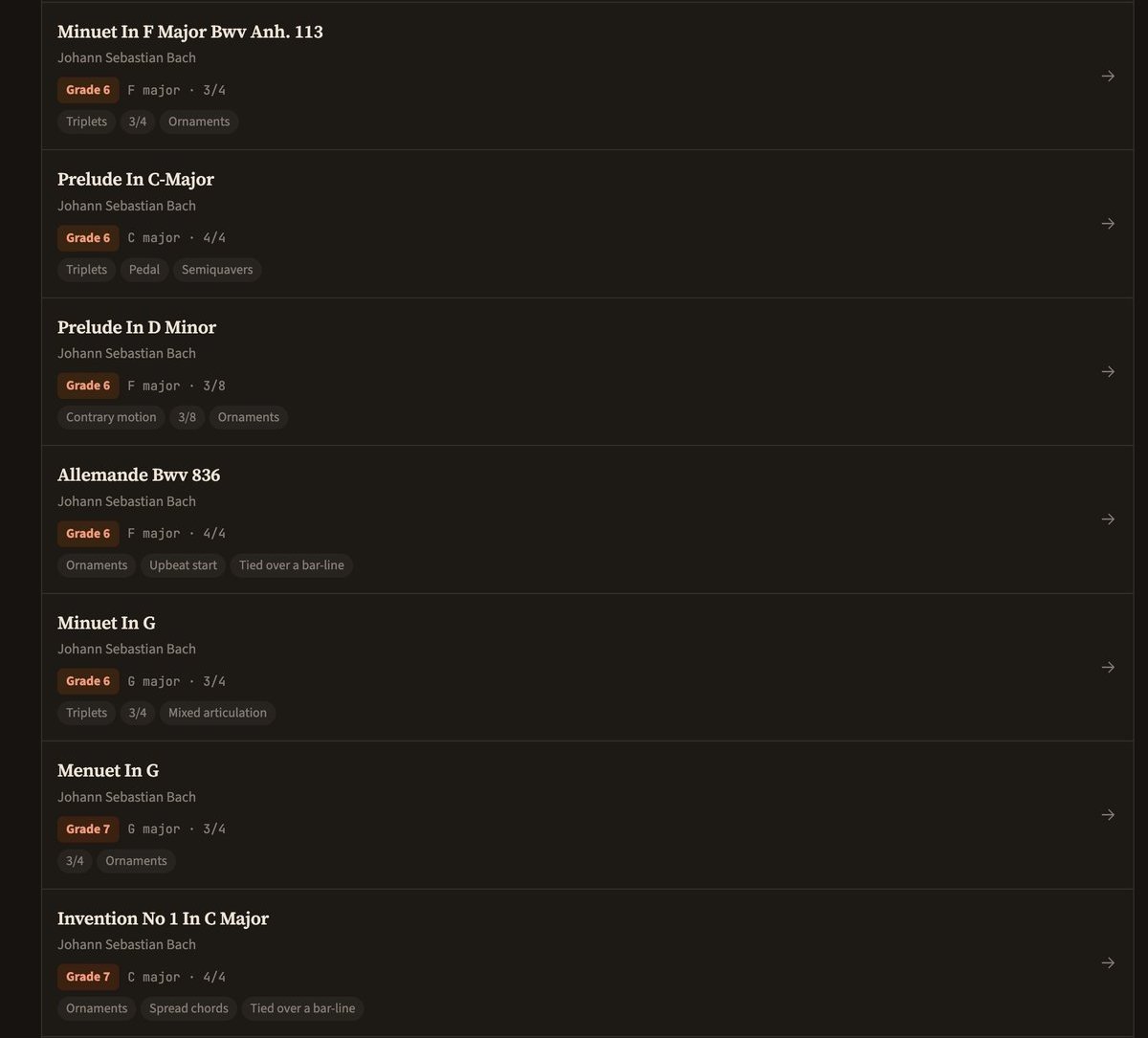
The Minuet in F, BWV Anh. 113, and the Minuet in G listed as Grade 6, the Prelude in D minor listed in F major, and the Invention No. 1 in C as Grade 7.
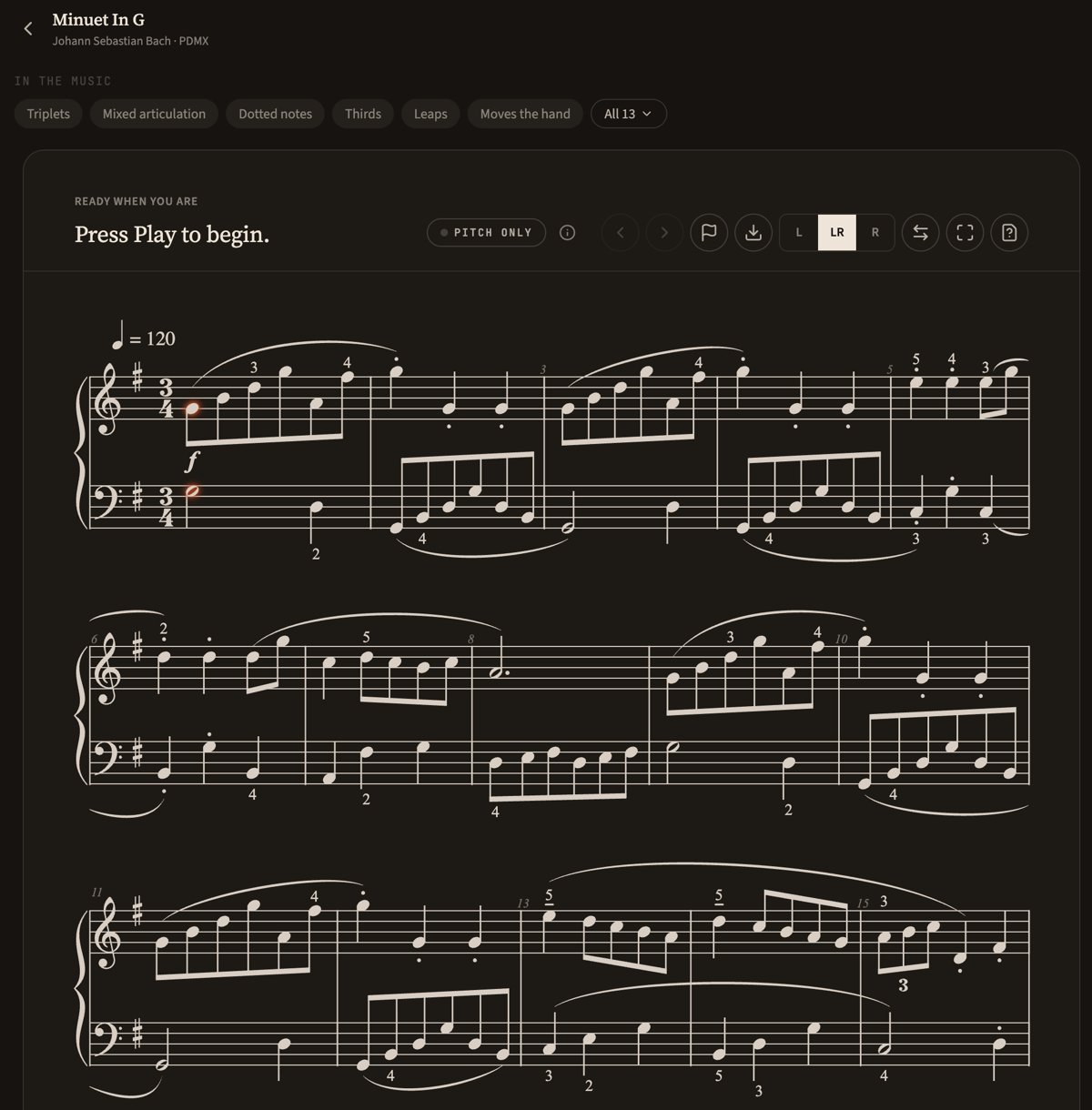
The Minuet in G, BWV Anh. 116, in SightReader. Its library labels it Grade 6; ABRSM set it at Grade 3 in 2023 and 2024.
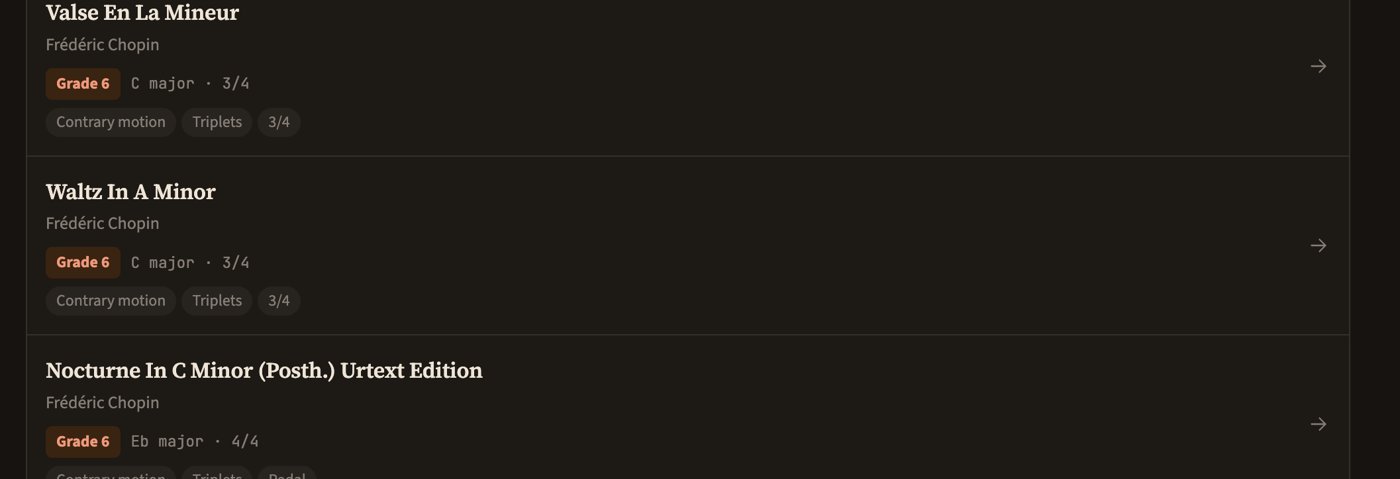
Chopin's Waltz in A minor, listed as C major.
A Bach chorale, side by side
Finally, I compared one Bach chorale in both apps: Gottlob, es geht nunmehr zu Ende, BWV 321. Piano Tree has it in B flat major, as in the standard editions. SightReader has it in G major and credits the score to PDMX, an open collection of scores uploaded by MuseScore users. There is no way to transpose it, and the voices are written inconsistently: in measure 5, the left hand's G is written as a unison with both stems pointing up, which is not how Bach wrote it. If it is an arrangement, it should say so.
To compare them fairly, I transposed Piano Tree's version to G major, which takes one click. SightReader cannot do the reverse.
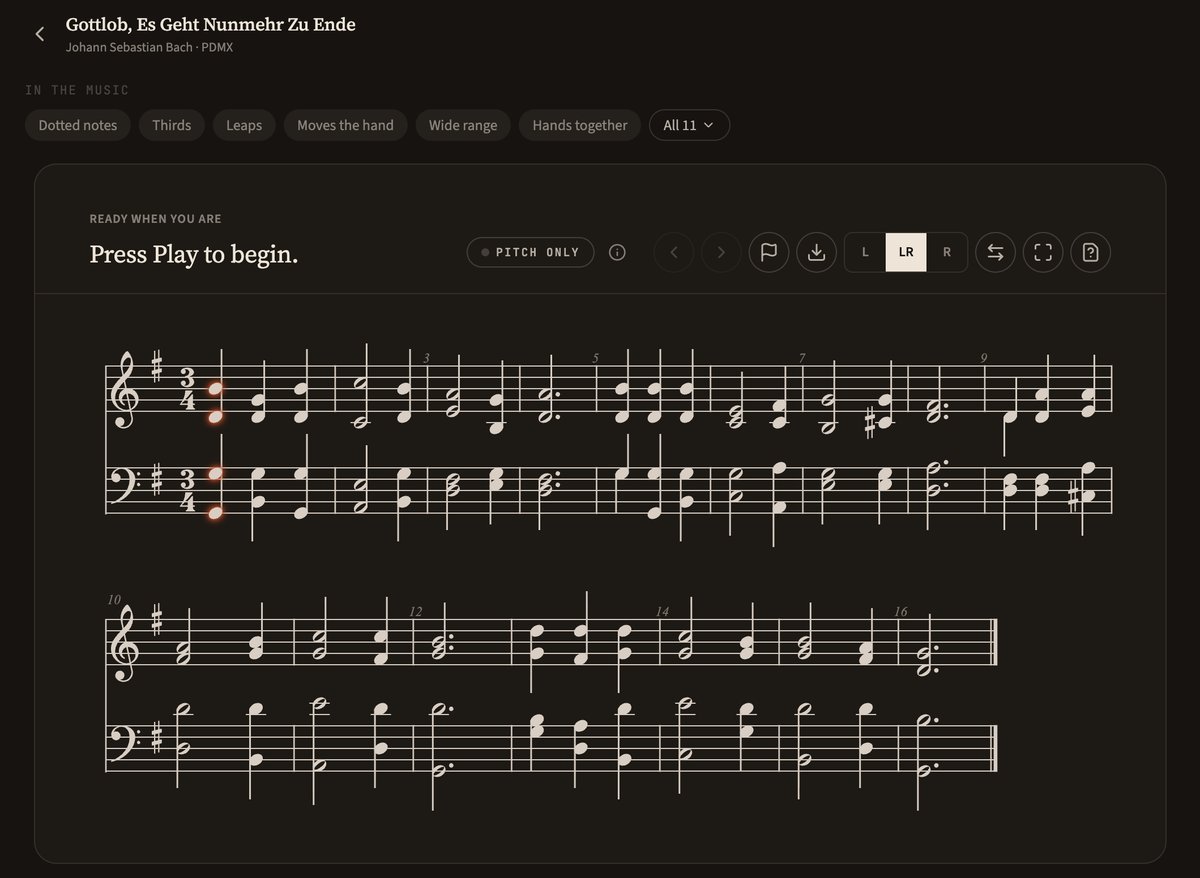
SightReader: BWV 321 in G major, credited to PDMX, practice by hand only.
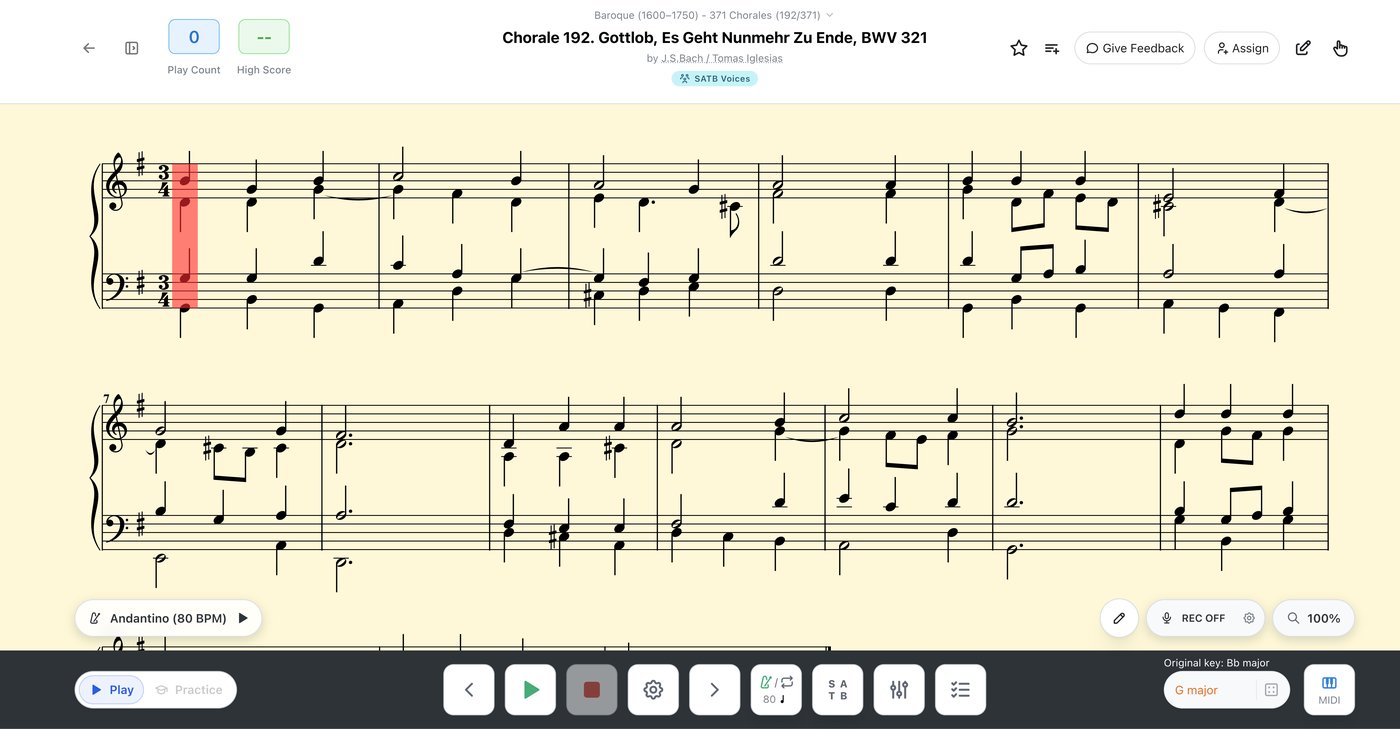
Piano Tree: the same chorale, transposed to G major in one click (the original key, B flat major, is shown at the bottom right), with Bach's voice leading, practice by voice, and an orchestral backing track.
In Piano Tree you see the real counterpoint of the chorale, you can practice any voice or combination of voices, and you can play with a backing track. SightReader lets you choose only left hand, right hand or both.
The experience
The lessons open with text to read before you play. In the time it takes to read it, a Piano Tree student would already have sight read five pieces. There are no backing tracks, and I found the dark score background hard to read.
If you have a correction to any of this, email us with the details and we will update this page.
Who builds each app?
SightReader is run by one person. In his own words on the SightReader About page, its founder is a software engineer who came back to the piano as an adult, and the homepage describes him as an adult learner picking piano up on the side. The About page credits no piano teachers.
Piano Tree is built by four pianists: two piano teachers and two software engineers. I have taught piano for more than 15 years and direct the School of Musical Arts in Auckland. Victor Nocelli, our popular music specialist, has performed on stages in Buenos Aires, Europe, Asia and the Americas. Benjamin Calace and Guillermo Caserotto, our engineers, are pianists who use the app in their own practice. You can meet the team on our About page.That difference shows in the music. Choosing what a student should read next, and in what order, is the core of teaching sight reading. It is what piano teachers do every week.
Software can check your notes. Only a teacher knows what you should read next.
What do you actually read?
SightReader's 3,700+ items are newly composed exercises and excerpts from classical pieces. Its free plan also includes up to ten generated exercises a day.
Piano Tree has seven times as much music, all of it written by people and graded into the Path: complete pieces, selected excerpts and original exercises.
- Repertoire from Baroque and Classical keyboard music to Romantic studies, hymns, jazz, blues, tango and pop, plus original pieces our teachers wrote for each level.
- Sight Reading Focus Packs that each train one sub-skill: intervals, ledger lines, rhythms for one or two hands, polyrhythms, cadences in random keys, imitations, fugue expositions, open score and more.
- Paul Harris's sight reading books, licensed from Faber Music.
- All 371 Bach chorales, with a chorale course that builds up to them one voice at a time.
- Lead sheets and grooves written by Victor Nocelli, for pop and jazz reading.
How far does each app take you?
SightReader runs from Initial to Grade 8. Piano Tree runs from first notes to diploma: 20 levels, each split into five sub-levels, so 100 small steps. Each step adds one new thing, from 4/4 time at Level 1A to triplets at 9A and the diploma repertoire at Level 20.
Both apps place you with a short test. Piano Tree's free Sight Reading Test gives you a Piano Reading Level (PRL), and our grade guides, from Initial Grade to diploma, show which Path levels match each ABRSM grade, with notes for Trinity, AMEB, RCM and LCM.Which app checks your rhythm better?
Timing is SightReader's main claim. Its Pitch & Rhythm mode marks notes as early or late, but its own homepage says this mode needs a MIDI keyboard, and that the timing scoring is new and still being tuned.
Piano Tree shows early and late notes with MIDI or with the microphone, so it works on an acoustic piano too. Our rhythm Focus Packs grade timing more strictly than pieces, swing pieces are scored in swing, and you can set how forgiving the timing is. Here is the microphone hearing big chords on an acoustic piano:
Which languages do they speak?
SightReader is in English only. Piano Tree is in English, Spanish and Chinese, and in English you can choose British or American terms: crotchets and quavers, or quarter notes and eighth notes.
How much do Piano Tree and SightReader cost?
Piano Tree Premium is $8.33 a month on the yearly plan, or $9.99 month to month, with 7 days free and no card needed. The free plan stays free, with hundreds of pieces and unlimited sight reading tests.
SightReader Pro is £48 a year, about $64, or £5 a month, about $6.70. Its free plan has 54 pieces and five scored exercises a day.
On the yearly plans, the difference is about $3 a month. Like most things in life, you get what you pay for. SightReader gives you 3,700+ pieces and exercises, up to Grade 8, in English. Piano Tree gives you seven times the music, from first notes to diploma, in three languages, with licensed books, backing tracks and the tools teachers asked for.
Your practice time is limited, and every hour spent on badly graded music is an hour your reading does not improve. Don't risk your music education to save a few dollars.
Which should you choose?
Choose Piano Tree if you want to read real music fluently, play an acoustic piano, are working toward an exam or a diploma, or teach piano and want reading material graded in small steps.
SightReader only makes sense if you want short daily drills written by an engine, with music poorly graded up to Grade 8, and you play on a MIDI keyboard.
Find your reading level in a few minutes. Take the free Sight Reading Test and start at the right step of the Path.Piano Tree vs SightReader: questions
Is Piano Tree or SightReader better for piano sight reading?
Piano Tree. It is built by piano teachers, has 25,000+ graded pieces from first notes to diploma, and gives live feedback by MIDI or microphone. SightReader has 3,700+ pieces and exercises up to Grade 8.
Who makes SightReader?
SightReader is run by a software engineer in London who came back to the piano as an adult, according to its About page. Piano Tree is built by a team of piano teachers and software engineers, all of them pianists.
Does SightReader use real music?
SightReader describes its library as newly composed exercises alongside excerpts from the classical canon, and its endless exercises are written by its own "engine". Piano Tree is real music written by people: complete pieces, selected excerpts, and original pieces and exercises written by its teachers.
Can I use SightReader or Piano Tree with an acoustic piano?
Both listen through the microphone, but SightReader's timing scoring needs a MIDI keyboard. Piano Tree shows wrong, early and late notes with the microphone on an acoustic piano.
Are SightReader's grade levels accurate?
In my test, several well-known pieces were labeled far from their usual grades. Chopin's Revolutionary Étude is labeled Grade 5, Bach's Invention No. 1 in C is labeled Grade 7 (ABRSM set it at Grade 4 in 2015 and 2016), the Minuet in G, BWV Anh. 116, is labeled Grade 6 (ABRSM Grade 3 in 2023 and 2024), and some minor-key pieces are labeled in major keys. In Piano Tree, every piece is placed by a piano teacher.
Which is cheaper?
SightReader costs about $64 a year (£48) for 3,700+ pieces up to Grade 8. Piano Tree costs about $100 a year ($8.33 a month on the yearly plan) for 25,000+ pieces up to diploma, with a free plan that stays free. That is about $3 a month more, and like most things in life, you get what you pay for. Your practice time is limited, so don't risk your music education to save a few dollars.
How we checked
SightReader's library size, levels, inputs, timing scoring, prices and founder details come from its own homepage, About page and App Store listing, checked on 25 November 2026. The test results and library labels come from my own test of the app on the same day, with screenshots above. The ABRSM grades for Bach's Invention No. 1 (Grade 4, 2015 and 2016) and the Minuet in G, BWV Anh. 116 (Grade 3, 2023 and 2024) are from ABRSM's piano syllabus for those years. SightReader's prices in pounds are converted to US dollars at about $1.34 to the pound, the rate on 25 November 2026. Prices and exchange rates can change. If anything here is out of date, email us and we will fix it.
- SightReader homepage
- SightReader About page
- SightReader on the App Store
The Short Version
If you want to read real music fluently, choose Piano Tree. It is built by piano teachers, has seven times the music, runs from first notes to diploma, and checks your timing on any piano. SightReader is a one-person app with 3,700+ pieces and exercises up to Grade 8, in English. In my test, its grade labels were far from the real levels, minor-key pieces were listed in major keys, and its Bach chorale had the voices written incorrectly: basic mistakes in grading, theory and counterpoint that a music teacher would not make.
More in this series: Piano Tree vs Piano Marvel, Piano Tree vs Sight Reading Factory, Piano Tree vs MasterPiano, Best Piano Sight Reading Apps for 2027, Initial Grade Piano Sight Reading